The Best E-Readers for Every Reader: Kindle Paperwhite, Colorsoft & Scribe 2026 Guide
Best e-readers 2026: Kindle Paperwhite, Colorsoft, Scribe & Kobo compared. Find the perfect device for your reading habits. See our guide.

The Best E-Readers for Every Reader: Kindle Paperwhite, Colorsoft & Scribe 2026 Guide
E-readers are still the best way to read without a backlit screen in your face. The Kindle lineup alone now covers five different use cases, from a $100 gateway device to a $330 note-taking tablet. Below is a plain comparison to help you pick the right one — and a note on Kobo for anyone who prefers to stay outside Amazon's ecosystem.
Quick Answer
Kindle Paperwhite (12th Gen) is the pick for most readers — 300 ppi E-Ink, IPX8 waterproofing, and weeks of battery life at a reasonable price. Kobo Clara BW is the better choice if you borrow regularly from a public library via Libby or OverDrive.
Table of Contents
Quick Comparison Table
| Model | Screen Size | Best For | Top Feature |
|---|---|---|---|
| Kindle Paperwhite (12th Gen) | 7" | Most readers | High-contrast E-Ink, waterproof |
| Kindle Colorsoft Signature | 7" color | Graphic novels & manga | Colorsoft color E-Ink display |
| Kindle Scribe | 10.2" | Note-taking, PDFs, professionals | Large writing surface & pen |
| Kindle (Entry-Level) | 6" | Budget buyers, travelers | Compact, lightweight |
| Kobo Clara BW | 6" | Open formats & library users | EPUB support & Libby integration |
How We Evaluate E-Readers
- Readability: contrast, ppi, and frontlight behavior for long sessions
- Ergonomics: weight, size, and physical buttons (if any)
- Battery life & charging (USB‑C where available)
- File format support and ecosystem openness
- Extra features: waterproofing, color displays, pen support, library integration
Detailed Product Reviews
- Kindle Paperwhite (12th Gen) — Best Overall
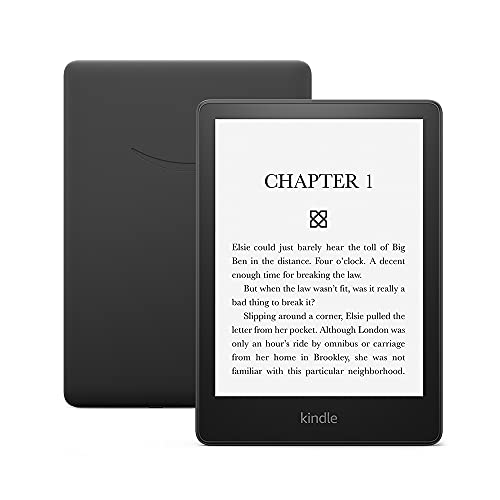
The Paperwhite is the one to get for most people. The 7" E-Ink screen has crisp text rendering, the adjustable warm light makes night reading comfortable, and IPX8 waterproofing means you can use it in the bath or by the pool without paranoia. Battery lasts weeks. It's the version Kindle has been trying to build for a decade.
Pros:
- High-contrast E-Ink with crisp text at 300 ppi
- Adjustable warm light for evening reading without the blue-light glare of a phone
- IPX8 waterproofing — rated for submersion up to 2 meters
Cons:
- Locked into the Amazon ecosystem — format limitations if you source books elsewhere
- No color support for graphic-heavy content
Amazon Kindle Paperwhite (8 GB) – Now with a larger display, adjustable warm light, increased battery life, and faster page turns – Black
Check price on Amazon →
👉 View product details
(#ad)
- Kindle Colorsoft Signature — Best Color E-Reader

The Colorsoft is Kindle's answer to graphic novel readers and manga fans who want color without switching to a backlit tablet. The Colorsoft display renders covers and illustrations with naturalistic hues rather than the blown-out look of a regular screen. It's not trying to replace a tablet — it's a reading device that happens to show color.
Pros:
- Color E-Ink rendering that looks natural on paper-like display
- Waterproof and adaptive frontlight
- Higher storage options for visual-heavy libraries
Cons:
- Color E-Ink shows its limits on anything with fast color gradients or fine detail
- Still locked into the Amazon ecosystem
Amazon Kindle Colorsoft Signature Edition 32GB (newest model) – With color display, auto-adjusting front light, wireless charging, and long battery life - Metallic Black
Check price on Amazon →
👉 View product details
(#ad)
- Kindle Scribe — Best for Note-Taking & Productivity

The Scribe is a different kind of device. The 10.2" screen is big enough to display a full PDF page without reflowing text, the included pen responds well, and the notebook and annotation features are actually thought through. Students annotating textbooks or researchers marking up papers will get real use from this. For pure novel reading, it's overkill.
Pros:
- Large screen handles PDFs and textbooks without uncomfortable zooming
- Pen input is responsive, with notebook organization and AI summarization tools
- Good for annotating documents you've sideloaded
Cons:
- Noticeably larger and heavier — doesn't fit in a jacket pocket
- Premium price aimed at heavy users; casual readers don't need it
Amazon Kindle Scribe (16GB) - Your notes, documents and books, all in one place. With built-in AI notebook summarization. Includes Premium Pen - Tungsten
Check price on Amazon →
👉 View product details
(#ad)
- Kindle (Entry-Level) — Best Budget Gateway

The entry Kindle is the lightest, cheapest way into the Kindle ecosystem. The 6" screen is good for novels and straightforward text. An improved front light and faster page turns make it a better device than earlier generations. If you read mostly novels and want something light to carry, it does the job.
Pros:
- Ultra-portable — genuinely pocketable
- Better front light and faster page turns than previous entry models
- Simple reading experience with nothing extra to configure
Cons:
- 6" screen is cramped for PDFs or books with complex layouts
- No waterproofing
Amazon Kindle 16 GB (newest model) - Lightest and most compact Kindle, now with faster page turns, and higher contrast ratio, for an enhanced reading experience - Black
Check price on Amazon →
👉 View product details
(#ad)
- Kobo Clara BW — Best Non-Amazon Alternative

If you borrow ebooks from your library via Libby or OverDrive, Kobo handles this better than Kindle. The Clara BW supports EPUB natively, has ComfortLight Pro and waterproofing, and doesn't require you to route everything through Amazon. The store selection is smaller than Kindle's, but if your main source is a library account, that barely matters.
Pros:
- Native EPUB support — works directly with library ebook loans
- Libby/OverDrive integration is built in and works well
- ComfortLight Pro and waterproofing — no feature compromises versus Paperwhite
Cons:
- Kobo store has a smaller title selection than Amazon's
- Some Kindle-specific features aren't available (Goodreads integration, X-Ray)
Kobo Clara BW | eReader | 6” Glare-Free Touchscreen with ComfortLight PRO | Dark Mode Option | Audiobooks | Waterproof | 16GB of Storage | Black
Check price on Amazon →
👉 View product details
(#ad)FAQ
Q: Which e-reader is best for graphic novels and manga?
A: The Kindle Colorsoft Signature Edition. It's the only one with color E-Ink that handles illustrated content without requiring a backlit screen.
Q: Can I borrow library books on Kindle?
A: Kindle does support library borrowing in some regions, but it's more cumbersome than Kobo. If you borrow from Libby or OverDrive frequently, Kobo Clara BW is the better choice.
Q: Is the Kindle Scribe worth it for students?
A: Yes, if you annotate PDFs regularly or want to take handwritten notes alongside your reading. If you mostly read regular books, the Paperwhite is better value.
Q: How long does Kindle battery life actually last?
A: Kindle advertises "weeks" of battery life — realistic under their test conditions of 30 minutes daily with Wi-Fi off. With daily active reading and Wi-Fi on, expect 2–3 weeks per charge on a Paperwhite. The Scribe with its larger screen drains faster.
Q: What's the difference between Kindle Paperwhite and Kindle Oasis?
A: The Oasis was the discontinued premium Kindle with physical page-turn buttons and an ergonomic asymmetric grip. Amazon replaced it with the Paperwhite as their flagship. The current Paperwhite 12th Gen is what you should buy new; Oasis units in stock are older hardware.
Q: Can I read EPUB files on a Kindle?
A: Yes, since a 2022 firmware update, Kindle natively supports EPUB. Before that, you had to convert files through Calibre or Amazon's Send-to-Kindle service. Native EPUB support handles most files correctly, though heavily formatted layouts may display differently than in a dedicated EPUB reader.
Final Recommendation
The Kindle Paperwhite is the right pick for most people — good screen, waterproof, reasonable price. If you read graphic novels or manga, the Kindle Colorsoft Signature is worth the premium for the color display. Students and researchers who annotate should look at the Kindle Scribe seriously. Anyone who borrows heavily from their public library should get the Kobo Clara BW for its superior library integration.
Related: Check out our guides on best hyaluronic acid serums and best wireless lavalier microphones.
Recommended
The 2026 Audio Upgrade: Which Amazon Smart Speaker Is Actually Right for Your Room?
Best Amazon Echo speakers 2026: Sound quality & smart home control compared. Find the perfect fit for your room. See our comparison.

5 Best Smart Rings for Health Tracking 2026: Oura Ring 4 and Premium Alternatives
RingConn Gen 2 wins on battery (10-12 days) with no monthly subscription. Oura Ring 4 has the deepest data but you pay ongoing fees. Our 2026 comparison.

Top 3 Wireless Lavalier Microphone Systems for Content Creators 2026
Best wireless lavalier mic systems for content creators in 2026. DJI Mic 2, Rode Wireless GO II & more — compared for range, audio quality & ease of use.
