5 Best Ergonomic Laptop Stands for 2026: Professional-Grade Stands for Comfortable Remote Work
5 best ergonomic laptop stands for 2026: Rain Design's aluminum iLevel2 vs Lamicall, BESIGN & OMOTON, tested for MacBook and PC desk setups at home.

5 Best Ergonomic Laptop Stands for 2026: Professional-Grade Stands for Comfortable Remote Work
Using a laptop flat on a desk puts your neck at a downward angle for hours at a time. A stand fixes this by raising the screen to eye level, which reliably reduces neck and shoulder tension if you work at a desk most of the day. The tradeoff is that you'll need an external keyboard and mouse — but that's a reasonable cost to avoid the postural problems that accumulate over months of laptop use.
Quick Answer
Lamicall Laptop Stand is the most stable all-around pick — solid build, adjustable viewing angle, and compatible with 10–16 inch laptops without wobble during typing. BESIGN LS03 is the budget choice if you just need the screen elevated and want to spend less.
Table of Contents
- How We Test Ergonomic Laptop Stands
- Quick Comparison Table
- Laptop Stands vs Books/DIY Solutions: What's the Difference?
- What to Look For in Ergonomic Laptop Stands
- Product Reviews
- Detailed Comparison Table
- Quick Reference Guide
- Care Tips for Laptop Stands
- Common Mistakes When Buying Laptop Stands
- FAQ
- Final Verdict
How We Test Ergonomic Laptop Stands
Each stand was evaluated on:
- Stability - how much wobble occurs during typing, especially with heavier laptops
- Height and angle adjustability - range of positions and ease of adjustment
- Build quality and materials - construction quality, finish, durability over time
- Ventilation - how well the design promotes airflow to prevent overheating
- Compatibility - tested with laptops ranging from 10 to 17 inches
- Portability - foldability, weight, how compact it gets when stored
- Ergonomic effectiveness - whether the stand actually positions the screen at a usable eye-level height
Quick Comparison Table
| Name | Key Feature | Best For | Height Range | Adjustability |
|---|---|---|---|---|
| Lamicall Laptop Stand | 360° rotating base | Overall best choice | Multiple positions | Height and angle |
| BESIGN LS03 | Fixed 6-inch elevation | Budget-conscious buyers | 6 inches | Fixed height |
| Rain Design iLevel2 | Spring-loaded adjustment | Premium MacBook users | 5.4-7.9 inches | Smooth slider |
| OMOTON Laptop Stand | 360° rotating base | Presentations and collaboration | Multiple positions | Height and angle |
| Lifelong Upryze | Extreme height (up to 20") | Tall users, standing desks | Up to 20 inches | Telescopic |
Laptop Stands vs Books/DIY Solutions: What's the Difference?
Stacking books under a laptop is technically a solution, but it tends to fall apart: books shift, there's no ventilation, and the height you can get is inconsistent. A dedicated stand gives you a fixed platform that won't move during typing, proper airflow channels to help the laptop avoid thermal throttling, and anti-slip pads that protect both surfaces. For occasional use, a book stack works. For daily work, a stand is worth the investment.
What to Look For in Ergonomic Laptop Stands
- Adjustable height - Multiple positions to hit true eye-level for your chair/desk combination
- Stable base design - Wider, weighted bases prevent wobble — particularly important with 15" and 16" laptops
- Ventilation design - Open frames let air circulate; solid platforms trap heat
- Anti-slip protection - Rubber pads or grips on both the arm rests and feet
- Compatibility range - Check that it actually fits your laptop size; most cover 10-17" but verify
- Portability - Foldable or detachable designs matter if you move between home and office
- Material quality - Aluminum builds are more durable and help with heat dissipation
Detailed Product Reviews
1. Lamicall Laptop Stand - Best Overall

The Lamicall is the most versatile pick here. Six pre-drilled holes give you real height and angle choices rather than a single fixed position, and the 360-degree rotating base makes it practical for presenting or sharing your screen without awkwardly turning the whole setup. The aluminum construction with weighted base keeps it stable even with a 16" MacBook Pro on it.
Pros:
- 360-degree rotating base makes screen sharing practical
- Six height/angle positions via pre-drilled holes
- Aluminum alloy with large weighted base — stable during typing
- Built-in ventilation promotes airflow
- Anti-slip silicone pads protect laptop and desk
- Folds flat for travel
- Fits 10-17.3 inch laptops
Cons:
- Requires initial assembly
- Heavier than ultra-portable options
- Some height adjustments may need tools
Lamicall Laptop Stand for Desk with 360 Rotating Base + Adjustable Tablet Stand
Check price on Amazon →
👉 View product details
(#ad)2. BESIGN LS03 Aluminum Laptop Stand - Best Budget

The BESIGN LS03 does one thing well: it elevates your laptop to 6 inches with a stable, ventilated aluminum frame at a low price. There's nothing to configure — assemble in three steps, put your laptop on it, done. The fixed height works for most average desk-and-chair setups. If you need height adjustability, look elsewhere, but for a permanent desk position this is reliable.
Pros:
- Fixed 6-inch elevation fits most standard desk/chair combinations
- Easy three-step assembly and disassembly
- Open aluminum design promotes airflow
- Rubberized grips hold laptops in place
- Supports up to 8.8 lbs with minimal wobble
- Lightweight and packable
Cons:
- Fixed height — can't adjust if the default 6 inches doesn't suit you
- Limited to laptops up to 15.6 inches
- No rotation for presentations
BESIGN LS03 Aluminum Laptop Stand, Ergonomic Detachable Computer Stand, Notebook Riser, Laptop Mount Compatible with Air, Pro, Dell, HP, Lenovo More 10-15.6" Laptops, Black
Check price on Amazon →
👉 View product details
(#ad)3. Rain Design iLevel2 - Best Premium

The iLevel2 is worth the higher price if you adjust your stand frequently — the spring-loaded mechanism lets you change height one-handed while the laptop is on it, which no budget stand can match. The anodized aluminum finish is also just nicer than anything in this price range, which matters if you care about your desk aesthetic. It's particularly popular with MacBook users because the finish matches well.
Pros:
- One-handed height adjustment with spring-loaded mechanism
- Anodized aluminum that acts as a heat sink
- No wobble even with larger laptops
- Multiple height positions with clearly labeled self-locking tabs
- Rubber pads protect laptop and desk surface
Cons:
- More expensive than other options here
- Limited to laptops up to 15 inches
- No rotation for presentations
Rain Design iLevel2 Adjustable Height Laptop Stand (Patented) (Space Gray)
Check price on Amazon →
👉 View product details
(#ad)4. OMOTON Laptop Stand - Best for Presentations

If you regularly present from your laptop or work in a shared space where you turn your screen toward others, the OMOTON's 360-degree rotating base is the feature you want. It's adjustable, foldable, and handles 10-16 inch laptops. The cable management channel on the back is a small but useful detail. Build quality isn't quite as solid as the Lamicall at comparable prices, but it's a reasonable trade for the portability.
Pros:
- 360-degree rotation for easy screen sharing
- Multiple height and angle adjustments
- Foldable and lightweight for travel
- Well-ventilated platform
- Anti-slip pads
- Disassembles into three parts for storage
- Cable outlet keeps desk tidy
Cons:
- Slight wobble possible with heavier laptops
- Only fits up to 16 inches
OMOTON Laptop Stand, Detachable Mount for MacBook Air/Pro Dell HP Silver
Check price on Amazon →
👉 View product details
(#ad)5. Lifelong Upryze Ergonomic Laptop Stand - Best for Standing Desks
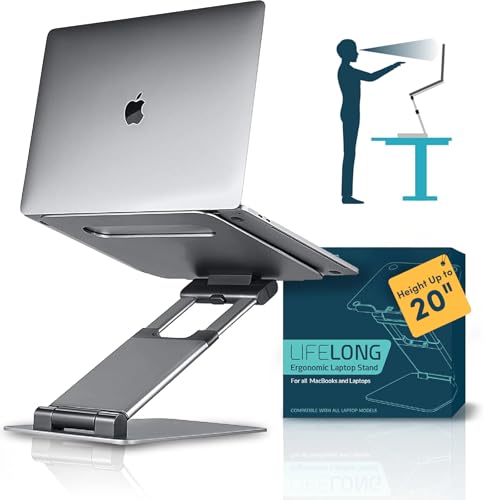
Standard laptop stands max out around 10-12 inches. If you're tall or use a standing desk, that's not enough. The Upryze reaches 20 inches and stays stable at full extension, which is the rare combination this category of buyer actually needs. It's heavier than standard stands, but that's partly why it doesn't wobble at height.
Pros:
- Height adjustable up to 20 inches — works for standing desk setups and tall users
- Solid metal construction with minimal wobble even at max height
- Dual-position tilt adjustment
- Compact footprint for the height range
- Folds for storage
- Fits 10-17 inch laptops
Cons:
- Heavy relative to standard laptop stands
- Initial height adjustment can be stiff
- Takes more time to set up optimally than simpler stands
Lifelong Aluminum Adjustable Laptop Stand, Extra Tall 20" Riser, Grey
Check price on Amazon →
👉 View product details
(#ad)Detailed Comparison Table
| Feature | Lamicall (Best Overall) | BESIGN LS03 (Best Budget) | Rain Design iLevel2 (Best Premium) | OMOTON (Best for Presentations) | Lifelong Upryze (Best Standing) |
|---|---|---|---|---|---|
| Height Range | Multiple positions | 6 inches fixed | 5.4-7.9 inches | Multiple positions | Up to 20 inches |
| Rotation | 360° rotating base | No | No | 360° rotating base | No |
| Compatibility | 10-17.3 inches | 10-15.6 inches | Up to 15 inches | 10-16 inches | 10-17 inches |
| Adjustability | Height and angle | Fixed | Spring-loaded slider | Height and angle | Telescopic |
| Material | Aluminum alloy | Aluminum alloy | Anodized aluminum | Aluminum | Metal |
| Portability | Foldable | Detachable | Fixed | Foldable | Foldable |
| Ventilation | Built-in design | Open design | Tilt design | Well-ventilated | Open design |
| Best For | Overall versatility | Budget simplicity | Premium MacBook users | Presentations | Standing desks, tall users |
Quick Reference Guide
| Use Case | Recommended Pick | Why |
|---|---|---|
| Overall best choice | Lamicall Laptop Stand | Adjustability, rotation, and stability in one package |
| Budget-friendly option | BESIGN LS03 | Simple, effective fixed-height design |
| Premium MacBook users | Rain Design iLevel2 | One-handed spring adjustment and matching aesthetics |
| Presentations and collaboration | OMOTON Laptop Stand | 360° rotation for easy screen sharing |
| Standing desks or tall users | Lifelong Upryze | Only option reaching 20 inches |
| Frequent travelers | Lamicall or OMOTON | Both fold flat for bags |
| Fixed desk setup | BESIGN LS03 or Rain Design iLevel2 | Stable designs for permanent placement |
Care Tips for Laptop Stands
- Regular cleaning - Wipe aluminum surfaces with a soft damp cloth. Avoid harsh cleaners that damage the finish.
- Check stability periodically - Ensure joints and connections stay tight, especially on adjustable stands.
- Protect rubber pads - Clean anti-slip pads regularly. Replace them if your laptop starts sliding.
- Store properly - Fold or disassemble when not in use to prevent accidental damage.
- Respect weight limits - Exceeding the rated capacity risks damaging both stand and laptop.
- Maintain ventilation - Keep airflow channels clear of dust.
Pro tip: On adjustable stands, check that moving parts slide smoothly periodically. A small amount of dry lubricant on stiff joints helps, but avoid anything that attracts dust.
Common Mistakes When Buying Laptop Stands
- Ignoring weight capacity - Check the limit before buying, especially with larger laptops.
- Choosing fixed height without measuring - Measure your ideal screen height before committing to a fixed-height stand.
- Overlooking ventilation - Solid platforms trap heat. Always check for open designs or ventilation channels.
- Not considering portability needs - If you move between locations, fixed stands are impractical.
- Skipping anti-slip features - Stands without grips risk dropping your laptop.
- Wrong size range - Verify the stand fits your specific laptop before ordering.
FAQ
Q: How high should my laptop screen be positioned?
A: The top of the screen should be at or slightly below eye level when you're sitting upright. For most average desk setups, 6-8 inches of elevation gets you there. Taller users or standing desks need significantly more.
Q: Can I use my laptop's built-in keyboard when it's on a stand?
A: Technically yes, but the angle will cause wrist strain quickly. The ergonomic point of a stand is to pair it with an external keyboard at a comfortable arm level.
Q: Do laptop stands help with overheating?
A: Yes, stands with open or ventilated designs improve airflow around the laptop. Aluminum stands also pull some heat away from the base. It's a real benefit, not just marketing.
Q: Are laptop stands worth the investment?
A: Yes. Neck and shoulder pain from poor monitor positioning is real, and it compounds over months of daily use. A stand is one of the cheapest fixes for a genuine ergonomic problem.
Q: Can I use a laptop stand with a standing desk?
A: Yes, but you need enough height adjustment. Look for stands reaching at least 15-20 inches for standing-desk use.
Q: Do all laptop stands work with all laptop sizes?
A: No. Check compatibility carefully. Most covers 10-16 inches; some go to 17.3 inches. Oversized laptops may not sit securely on smaller stands.
Final Verdict
The Lamicall Laptop Stand is the best pick for most people. It's adjustable, rotates for presentations, and stays stable under heavier laptops. That covers the majority of use cases.
If price is the main concern, the BESIGN LS03 does the job simply and well for a fixed desk position. The Rain Design iLevel2 justifies its cost for MacBook users who adjust their stand height frequently. The OMOTON is the practical choice if you present from your laptop regularly. The Lifelong Upryze solves a specific problem — adequate height for standing desk or tall-user setups — that no other stand here addresses.
Whichever you choose, pair it with an external keyboard and mouse. That's when the ergonomic benefit actually materializes.
Building your ergonomic workspace? Check out our guides on mechanical keyboards, wireless headphones, and standing desks.
Recommended
The 2026 Audio Upgrade: Which Amazon Smart Speaker Is Actually Right for Your Room?
Best Amazon Echo speakers 2026: Sound quality & smart home control compared. Find the perfect fit for your room. See our comparison.

The Best E-Readers for Every Reader: Kindle Paperwhite, Colorsoft & Scribe 2026 Guide
Best e-readers 2026: Kindle Paperwhite, Colorsoft, Scribe & Kobo compared. Find the perfect device for your reading habits. See our guide.

5 Best Smart Rings for Health Tracking 2026: Oura Ring 4 and Premium Alternatives
RingConn Gen 2 wins on battery (10-12 days) with no monthly subscription. Oura Ring 4 has the deepest data but you pay ongoing fees. Our 2026 comparison.
