Best USB-C Hubs for MacBook and Windows in 2026: Professional Review & Buyer's Guide
Best USB-C hubs 2026: 5 hubs tested for 4K output, 100W pass-through charging & dropout-free stability on MacBook and Windows laptops.

Best USB-C Hubs for MacBook and Windows in 2026: Professional Review & Buyer's Guide
Most modern laptops ship with two USB-C ports and nothing else. That's fine until you want an external monitor, a wired Ethernet connection, and an SD card reader at the same time. A USB-C hub solves this with one cable. The picks below cover everyday use, full USB-C ecosystems, budget setups, dual-monitor workstations, and enterprise reliability — all tested for 4K video output and power delivery accuracy.
Quick Answer
Anker 555 USB-C Hub (8-in-1) is the pick for most people — 4K HDMI, 100W pass-through charging, SD card reader, and USB-A ports in one compact hub. Baseus 12-in-1 is the better choice if you need dual monitor output or want a full desktop dock setup.
Table of Contents
- Quick Comparison Table
- How We Test USB-C Hubs
- What to Look For
- USB-C Hubs vs Docking Stations: What's the Difference?
- Product Reviews
- Detailed Comparison Table
- Quick Reference Guide
- Care Tips / How to Use
- Common Mistakes When Buying USB-C Hubs
- FAQ
- Final Verdict
Quick Comparison Table
| Name | Type | Key Feature | Best For | Power Delivery |
|---|---|---|---|---|
| Anker 555 (8-in-1) | Hub | Comprehensive connectivity | All users | 100W |
| EZQuest Slim Gen 2 | Hub | Pure USB-C design | Modern ecosystems | 80W |
| Anker 341 (7-in-1) | Hub | Budget entry | Cost-conscious | 85W |
| Baseus 12-in-1 | Docking Station | Dual displays | Multi-monitor | 100W |
| Belkin Connect Pro | Hub | Enterprise support | Business use | 100W |
How We Test USB-C Hubs
Each hub was tested for:
- Video output quality - confirmed 4K@60Hz support, color accuracy, and multi-display behavior
- Data transfer speeds - USB 3.2 Gen 2 (10Gbps) performance verified with SSDs
- Power delivery - USB-C PD accuracy under simultaneous use of multiple ports
- Cross-platform compatibility - driver-free operation tested on macOS Sonoma and Windows 11
- Build quality - port durability, cable quality, and temperature under sustained load
- Port configuration - practical balance between legacy and modern connections
USB-C Hubs vs Docking Stations: What's the Difference?
Hubs add ports to a single USB-C connection in a compact, portable form. They're the right tool for adding one monitor, Ethernet, and a card reader. Docking stations are desk-based solutions for permanent setups — multiple displays, dedicated Ethernet, more ports, and often separate power adapters. A hub is what most people need. A docking station is what a dual-monitor home office setup needs.
What to Look For
- Video Output - True 4K@60Hz for professional displays; 4K@30Hz is noticeably less smooth in day-to-day use
- Power Delivery - 60W minimum for laptop charging; 100W handles larger laptops fully under load
- Data Ports - USB 3.2 Gen 2 (10Gbps) for fast external SSD transfers; USB 3.0 (5Gbps) is fine for peripherals
- Cross-Platform Support - Driver-free operation on both macOS and Windows is the expectation, but verify for your specific laptop
- Port Mix - The right balance of USB-A (legacy peripherals), USB-C, HDMI, and card readers for your actual use case
- Build Quality - Aluminum shells manage heat better than plastic; important for sustained use
Detailed Product Reviews
- Anker 555 USB-C Hub (8-in-1) - Best Overall

The Anker 555 is the hub most reviewers recommend as a baseline because it delivers on every core spec without a significant price premium. True 4K@60Hz HDMI, 100W power delivery, 10Gbps data ports, Gigabit Ethernet, and both SD and microSD card readers in one compact hub. Works on macOS and Windows without drivers. If you're not sure what you need and want something that covers the practical bases, this is it.
Pros:
- True 4K@60Hz HDMI output
- 100W USB-C Power Delivery for full-speed laptop charging
- 10Gbps data transfer on USB-A and USB-C ports
- Gigabit Ethernet for stable wired networking
- SD and microSD card readers
- Driver-free on macOS and Windows
Cons:
- Bulkier than ultra-slim alternatives
- Single display output only
- Some intensive setups may require the laptop's own charger in addition
Anker 555 USB-C Hub (8-in-1) for Notebook/Monitor - Memory Card Reader - MicroSD, SD - 100W - 4K 3840x2160 - 2 USB-A Ports - 1 USB Type-C - Supports 1 Display
Check price on Amazon →
👉 View product details
(#ad)
- EZQuest USB-C Slim Gen 2 - Best USB-C Ecosystem
If your setup is entirely USB-C — display, peripherals, everything — the EZQuest Slim Gen 2 is the cleanest solution. Four USB-C 3.2 Gen 2 ports at 10Gbps, 4K@60Hz DisplayPort video output, 80W power delivery, and a 50cm braided cable for flat desk placement. At 85g it's light enough to travel with. The trade-off is no USB-A ports — older peripherals need a separate adapter.
Pros:
- Four USB-C 3.2 Gen 2 ports at 10Gbps
- Dedicated 4K@60Hz USB-C DisplayPort output
- 80W Power Delivery with Fast Role Swap
- 50cm braided cable for desk flexibility
- 85g — genuinely portable
- Driver-free across all major platforms
Cons:
- No legacy USB-A ports — incompatible with older peripherals
- No card reader
- Requires a USB-C display for video output
Best USB-C Ecosystem Product
Check price on Amazon →
👉 View product details
(#ad)
- Anker 341 USB-C Hub (7-in-1) - Best Budget

The Anker 341 is the right pick when you want Anker's reliability at a lower price and don't need Gigabit Ethernet or 4K@60Hz video. The 4K@30Hz HDMI output is fine for spreadsheets and documents; it becomes slightly noticeable scrolling and gaming. 85W power delivery, dual USB-A 3.2 ports, and SD/microSD card readers cover most everyday needs. If Ethernet and higher-spec video aren't requirements, it does what a hub should do for less money.
Pros:
- 4K HDMI output at 30Hz — sufficient for most display work
- 85W USB-C Power Delivery
- Dual USB-A 3.2 Gen 1 ports with 5Gbps data transfer
- SD and microSD card slots
- Compact — easy to carry
- Anker's track record for quality and support
Cons:
- 4K output limited to 30Hz — not ideal for video editing or gaming
- No Ethernet
- Less capable than the 555 at a smaller price difference than expected
Anker 341 USB-C Hub (7-in-1) with 100W USB-C Charger
Check price on Amazon →
👉 View product details
(#ad)
- Baseus 12-in-1 Docking Station - Best Dual Display
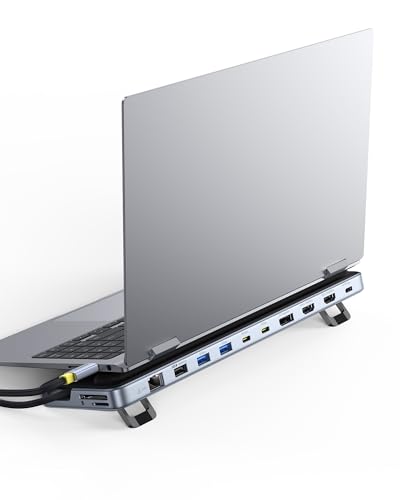
The Baseus 12-in-1 is the most useful recommendation for anyone building a permanent home office with two external monitors. Simultaneous dual 4K@60Hz outputs via HDMI and DisplayPort, 100W power delivery, Gigabit Ethernet, 10Gbps USB ports, and TF/SD card readers. The stand design keeps it off the desk surface and improves heat dissipation. It requires a separate USB-C power adapter, which adds to the total cost but is necessary for driving dual displays. Rounding out that setup with a proper camera makes a real difference on video calls — see our webcams for streaming and Zoom guide for picks that beat a laptop's built-in camera.
Pros:
- Simultaneous dual 4K@60Hz output via HDMI and DisplayPort
- 100W USB-C Power Delivery
- Gigabit Ethernet
- 10Gbps USB data ports
- Stand design improves heat dissipation and desk organization
Cons:
- Requires a separate USB-C power adapter for full dual-display operation
- Larger footprint — not for travel
- More complex initial setup for multi-display configuration
Baseus Laptop Docking Station Stand, 12 in 1 Triple 4K Display HDMI/DP, 10Gbps USB A/C Fast Data, PD 100W, Ethernet, TF/SD, USB C Docking Station with Stand for Windows/Dell/HP/Lenovo/Asus/Acer/Mac
Check price on Amazon →
👉 View product details
(#ad)
- Belkin Connect Universal Pro - Best Enterprise

Belkin's Connect Universal Pro is for organizations and IT departments that need documented reliability and warranty support. Dual 4K@60Hz display support with Silicon Motion technology, 10Gbps data transfer, 100W power delivery, Gigabit Ethernet, polished aluminum construction, and a 2-year warranty. It costs more than the Baseus for similar specs, but the build quality difference is real and the warranty coverage matters in a managed device environment.
Pros:
- Dual 4K@60Hz display support
- 10Gbps data transfer speeds
- 100W Power Delivery
- Gigabit Ethernet
- Polished aluminum build quality
- 2-year manufacturer warranty
Cons:
- More expensive than alternatives with comparable specs
- Larger and heavier than consumer hubs
- Not portable — designed for desk use
Belkin USB-C Hub 8 in 1 Dual Display
Check price on Amazon →
👉 View product details
(#ad)Detailed Comparison Table
| Feature | Anker 555 (8-in-1) | EZQuest Gen 2 | Anker 341 (7-in-1) | Baseus 12-in-1 | Belkin Connect Pro |
|---|---|---|---|---|---|
| Video Output | 4K@60Hz HDMI | 4K@60Hz USB-C | 4K@30Hz HDMI | Dual 4K@60Hz | Dual 4K@60Hz |
| USB-A Ports | 2x 10Gbps | None | 2x 5Gbps | 3x 10Gbps | 2x 10Gbps |
| USB-C Ports | 1x 10Gbps | 4x 10Gbps | 1x 10Gbps | 2x 10Gbps | 2x 10Gbps |
| Power Delivery | 100W | 80W | 85W | 100W | 100W |
| Ethernet | Gigabit | None | None | Gigabit | Gigabit |
| Card Readers | SD + microSD | None | SD + microSD | TF + SD | None |
Quick Reference Guide
| Use Case | Recommended Pick | Why |
|---|---|---|
| Comprehensive daily use | Anker 555 (8-in-1) | Best balance of features and price |
| Modern USB-C ecosystem | EZQuest Slim Gen 2 | All USB-C with no legacy compromise |
| Budget-conscious | Anker 341 (7-in-1) | Core features at lower cost |
| Dual-monitor workstation | Baseus 12-in-1 | Genuine dual 4K@60Hz capability |
| Enterprise reliability | Belkin Connect Pro | Warranty and build quality for managed environments |
Care Tips / How to Use
- Ventilation - Keep space around the hub for airflow during intensive use
- Cable Management - Use cable ties to prevent stress on the hub's ports
- Regular Cleaning - Clean ports with compressed air when dust accumulates
- Power Management - Unplug when not in use to extend component lifespan
- Compatibility Testing - Test all ports when first connecting to a new device
Common Mistakes When Buying USB-C Hubs
- Underestimating Power Needs - Ensure 60W+ PD for full laptop charging, especially under display load
- Ignoring Video Specifications - 4K@30Hz versus 4K@60Hz is a visible difference during normal scrolling
- Overlooking Data Speeds - USB 3.2 Gen 1 (5Gbps) versus Gen 2 (10Gbps) matters for external SSD transfers
- Not Checking OS Compatibility - Some hubs have quirks on macOS; verify for your specific laptop model
- Buying on Port Count Alone - A hub with 12 ports but slow data speeds or 30Hz video is worse than one with 7 good ports
FAQ
Q: Do USB-C hubs work with both MacBook and Windows laptops?
A: Most do, driver-free. Some advanced features like video output modes can behave differently between platforms. Check product reviews from users on your specific laptop model.
Q: What's the difference between USB-C hubs and docking stations?
A: Hubs are compact and portable — they add ports for everyday use. Docking stations are desk-based setups for permanent workstations needing multiple displays and more connections. Hubs for travel; docks for fixed setups.
Q: Can USB-C hubs charge my laptop while using other ports?
A: Yes, if the hub has USB-C PD. Look for 60W+ to charge the laptop at full speed while running a display and other peripherals simultaneously.
Q: Do I need different hubs for MacBook vs Windows?
A: Not usually. Most hubs work on both without drivers. Some display output modes have platform-specific behavior, particularly with multi-display setups on M-series Macs.
Q: What's the most important feature to look for in a USB-C hub?
A: True 4K@60Hz video output and adequate power delivery (60W+) matter most for daily use. Those two specs prevent the most common frustrations.
Q: Is the EZQuest USB-C Slim Gen 2 worth it if I still have USB-A peripherals?
A: No — it has zero USB-A ports, so any older mouse, keyboard, or drive needs a separate adapter. It's the right pick only if your accessories are already USB-C. The Anker 555 keeps two USB-A ports alongside the newer connectors and covers both worlds.
Q: What's the main trade-off between the Anker 341 and the Anker 555?
A: The 341 costs less but caps out at 4K@30Hz video and drops Ethernet entirely, which shows up as slightly stuttery scrolling on an external monitor. The 555 adds Gigabit Ethernet and true 4K@60Hz for a modest price jump. Skip the 341 if you'll be on a wired network or staring at a 4K display for hours a day.
Q: Do I need the Belkin Connect Universal Pro over the Baseus 12-in-1 for a home office?
A: Not for most people. Both deliver dual 4K@60Hz output, Gigabit Ethernet, and 100W power delivery at similar port counts. The Belkin's aluminum build and 2-year warranty are aimed at IT-managed fleets, not a single home desk — the Baseus gets you the same daily performance for less.
Final Verdict
The Anker 555 is the right hub for most people. It delivers on every important spec, works without drivers, and Anker's quality control is reliable.
For users with an all-USB-C setup, the EZQuest Slim Gen 2 is the cleaner solution. The Anker 341 saves money with acceptable trade-offs for anyone who doesn't need Ethernet or 4K@60Hz. The Baseus 12-in-1 is the practical pick for dual-monitor home offices. The Belkin Connect Universal Pro is worth the premium for organizations that need documented warranty coverage and enterprise-grade build.
Related: Check out our guides on best wireless earbuds, best mechanical keyboards, and best portable chargers.
Recommended
The 2026 Audio Upgrade: Which Amazon Smart Speaker Is Actually Right for Your Room?
Best Amazon Echo speakers 2026: Sound quality & smart home control compared. Find the perfect fit for your room. See our comparison.

The Best E-Readers for Every Reader: Kindle Paperwhite, Colorsoft & Scribe 2026 Guide
Best e-readers 2026: Kindle Paperwhite, Colorsoft, Scribe & Kobo compared. Find the perfect device for your reading habits. See our guide.

5 Best Smart Rings for Health Tracking 2026: Oura Ring 4 and Premium Alternatives
RingConn Gen 2 wins on battery (10-12 days) with no monthly subscription. Oura Ring 4 has the deepest data but you pay ongoing fees. Our 2026 comparison.
