Best Webcams for Streaming & Zoom in 2026: Top Picks for Home Offices and Creators
Best webcams for streaming & Zoom in 2026 — 4K, 1080p & wide-angle picks for home offices and content creators. Image quality compared.

Best Webcams for Streaming & Zoom in 2026: Top Picks for Home Offices and Creators
Your laptop's built-in webcam is fine until someone on the other end of a call asks if you're in a cave. A dedicated webcam fixes the image quality, adds a real microphone, and in better models brings AI framing and background noise cancellation. The five picks below cover different priorities: budget AI features, professional meeting quality, content creation, 4K recording, and full streaming setups.
Quick Answer
Obsbot Meet SE is the best webcam for most home offices — AI auto-framing keeps you centered without touching anything, and 1080p at 100fps looks sharper than any built-in laptop camera. Logitech Brio 505 is the pick for professional meetings where consistent color accuracy matters more than AI features.
Table of Contents
- Quick Comparison Table
- How We Evaluated Webcams
- What to Look For
- Webcams vs DSLR Cameras: What's the Difference?
- Product Reviews
- Detailed Comparison Table
- Quick Reference Guide
- Care Tips / How to Use
- Common Mistakes When Buying Webcams
- FAQ
- Final Verdict
Quick Comparison Table
| Name | Type | Key Feature | Best For | Resolution |
|---|---|---|---|---|
| Obsbot Meet SE | Budget AI | Auto-framing | Casual users | 1080p/100fps |
| Logitech Brio 505 | Professional | Show Mode | Business calls | 1080p/30fps |
| Elgato Facecam MK.2 | Streaming | Uncompressed video | Content creators | 1080p/60fps |
| Insta360 Link 2C | 4K Premium | AI noise cancellation | 4K recording | 4K/30fps |
| Obsbot Tiny 2 | Professional AI | Mechanical gimbal | Streamers | 4K/30fps |
How We Evaluated Webcams
Each camera was assessed on:
- Image Quality - Resolution, frame rate, low-light performance, color accuracy in varied lighting
- AI Features - Auto-framing accuracy, tracking smoothness, gesture control, noise cancellation
- Compatibility - Driver-free operation with Zoom, Teams, OBS, and streaming platforms
- Build Quality - Sensor size, aperture, physical construction
- Audio Quality - Built-in microphone performance in real call conditions
- Value - Feature depth relative to price and use case
Webcams vs DSLR Cameras: What's the Difference?
Webcams plug in and work immediately with conferencing software, have built-in AI features optimized for video calls, and cost a fraction of a camera setup. DSLR cameras offer better image quality and manual control but need capture cards, proper lenses, and specific software to use as webcams. For streaming and calls, webcams win on practicality. DSLR setups make sense for pre-recorded content where image quality is the primary concern.
What to Look For
- Resolution & Frame Rate - 1080p minimum; 60fps gives noticeably smoother motion than 30fps
- Sensor Size - Larger sensors (1/2-inch or bigger) handle low-light situations better
- AI Features - Auto-framing keeps you centered if you move; noise cancellation helps in home offices
- Connectivity - USB-C preferred for modern devices
- Built-in Microphone - Dual mics with noise reduction matter more than resolution for call quality
- Privacy Features - Physical shutters provide peace of mind for video off situations
Detailed Product Reviews
- Obsbot Meet SE - Best Value Overall

The Obsbot Meet SE replaced the Logitech C920 as the default budget webcam recommendation, and the jump in features is real. At this price point you're getting 1080p at up to 100fps, AI auto-framing that adjusts within a 4x zoom range as you move, and gesture control (open palm to trigger framing, thumbs up for zoom). The 1/2.8-inch sensor handles typical indoor lighting well. The microphone relies on your computer's input — audio is the clear weak point.
Pros:
- 1080p/100fps with AI auto-framing at a budget price
- 1/2.8-inch CMOS sensor with staggered HDR
- Gesture control for hands-free framing adjustments
- Dual native ISO for decent low-light performance
- 33g — lightweight, mounts on any monitor
Cons:
- AI framing works best in well-lit environments — struggles in dim rooms
- No built-in microphone worth using — you need a separate mic or rely on your computer
- Limited manual controls for advanced users
OBSBOT Meet SE 1080P 100FPS Webcam for PC, AI Framing Streaming Camera
Check price on Amazon →
👉 View product details
(#ad)
- Logitech Brio 505 - Best for Professional Meetings

The Brio 505 is the most work-meeting-specific camera here. Logitech's Rightlight 4 technology automatically corrects for difficult lighting — backlighting, harsh overhead lights, dim rooms — and keeps the image consistent across different environments. Show Mode lets you tilt the camera 90 degrees down to your desk for presenting physical documents or demonstrating a product, which is genuinely useful for client calls. Physical privacy shutter and Teams/Zoom/Meet certification matter for professional environments.
Pros:
- Rightlight 4 handles difficult lighting conditions automatically
- Show Mode tilts to desk for presenting physical items
- Dual noise-reduction microphones with background filtering
- 90-degree adjustable field of view
- Physical privacy shutter
- Certified for Microsoft Teams, Zoom, and Google Meet
Cons:
- 30fps — smooth for conferencing but not for motion-heavy content
- No AI auto-framing or tracking
- Price is on the higher end for a 1080p/30fps camera
Logitech Brio 505 Full HD 1080p Business Webcam with Auto Light Correction
Check price on Amazon →
👉 View product details
(#ad)
- Elgato Facecam MK.2 - Best for Content Creators

The Facecam MK.2 is the pick when stream quality matters. Uncompressed 1080p at 60fps sends raw video to your encoding software without the compression artifacts that make most webcams look soft in recorded footage. The Sony sensor with HDR produces accurate color. PTZ (pan-tilt-zoom) control through the Camera Hub software lets you position the frame without physically moving the camera. No drivers required on most systems.
Pros:
- Uncompressed 1080p/60fps eliminates compression artifacts in recordings
- Sony sensor with HDR support
- PTZ control via Camera Hub software
- Built-in privacy shutter
- Extensive Camera Hub customization for brightness, contrast, sharpness, and presets
- No drivers required
Cons:
- More expensive than basic webcams for the same 1080p resolution
- Audio is limited — separate microphone recommended for streaming
- Fixed position requires software PTZ rather than physical tracking
Elgato Facecam MK.2, Premium Full HD Webcam, HDR
Check price on Amazon →
👉 View product details
(#ad)
- Insta360 Link 2C - Best 4K Webcam Pick

The Link 2C is the strongest 4K option for users who want image quality and AI features without the complexity of the Obsbot Tiny 2. The 1/2-inch sensor and F1.8 aperture combination handles low light noticeably better than cameras with smaller sensors or higher f-numbers. The AI noise cancellation on the built-in microphone actually removes background audio distractions rather than just cutting the volume. Smart Whiteboard and DeskView modes extend its use to presentations and desk demos.
Pros:
- True 4K (3840x2160) at 30fps
- 1/2-inch sensor with F1.8 aperture — strong low-light performance
- AI noise cancellation removes background audio
- Smart Whiteboard and DeskView presentation modes
- Gesture control and smartphone remote operation
- Natural background blur from the wide aperture
Cons:
- Most conferencing platforms cap output at 1080p — 4K only benefits local recording
- Fixed position with no mechanical movement
- Feature set exceeds what casual call users need
Insta360 Link 2C - 4K Webcam for PC/Mac, 1/2" Sensor, Auto Framing, HDR, AI Noise-Canceling Mic, Gesture Control for Streaming, Video Calls, Gaming, Works with Zoom, Teams, Twitch & More
Check price on Amazon →
👉 View product details
(#ad)
- Obsbot Tiny 2 - Best for Professional Streamers
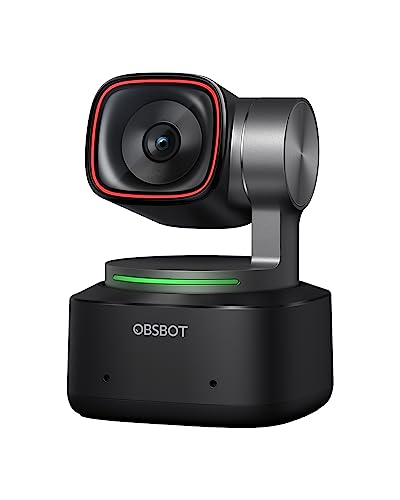
The Obsbot Tiny 2 is the most technically capable webcam here. The mechanical gimbal lets the camera physically pan and tilt — either following you automatically via AI tracking or responding to voice commands and hand gestures. A 50MP CMOS sensor with pixel binning produces strong 4K image quality, and 0.3-second autofocus is fast enough for quick movements. SDK support for custom integrations makes it useful for multi-camera streaming setups.
Pros:
- 4K with 50MP CMOS sensor and pixel binning
- Mechanical pan/tilt gimbal with AI tracking, voice commands, and gesture control
- 0.3-second autofocus with all-pixel focus technology
- Multiple AI tracking modes (upper body, close-up, hand, zone)
- Beauty mode and specialized modes (whiteboard, portrait, group)
- SDK support for custom streaming integrations
Cons:
- Expensive — the feature set commands a real premium
- Gets warm during extended sessions (expected, not a fault)
- Complex feature set requires setup time; casual users don't need this
OBSBOT Tiny 2 Webcam 4K Voice Control PTZ, AI Tracking Multi-Mode & Auto Focus, Web Camera with 1/1.5" Sensor, Gesture Control, 60 FPS, HDR Light Correction, Webcam for PC, Streaming, Meeting, etc.
Check price on Amazon →
👉 View product details
(#ad)Detailed Comparison Table
| Feature | Obsbot Meet SE | Logitech Brio 505 | Elgato Facecam MK.2 | Insta360 Link 2C | Obsbot Tiny 2 |
|---|---|---|---|---|---|
| Resolution | 1080p/100fps | 1080p/30fps | 1080p/60fps | 4K/30fps | 4K/30fps |
| Sensor Size | 1/2.8-inch | Not specified | Sony sensor | 1/2-inch | 1/1.5-inch |
| AI Features | Auto-framing, gesture | Auto-focus, Show Mode | PTZ control | Auto framing, noise cancel | AI tracking, voice control |
| Audio | Basic | Dual mics, noise reduction | Basic | AI noise cancel | Basic |
| Privacy | None | Physical shutter | Slide shutter | None | None |
Quick Reference Guide
| Use Case | Recommended Pick | Why |
|---|---|---|
| Budget video calls | Obsbot Meet SE | AI features at an accessible price |
| Professional meetings | Logitech Brio 505 | Lighting correction and Show Mode |
| Content creation | Elgato Facecam MK.2 | Uncompressed video for streaming |
| 4K recording | Insta360 Link 2C | Large sensor with AI noise cancel |
| Professional streaming | Obsbot Tiny 2 | Mechanical tracking and SDK support |
Care Tips / How to Use
- Optimal Positioning - Eye level, 2-3 feet from your face. Most people mount too low or too high.
- Lighting Setup - Soft light from in front of you, not behind. Backlighting is the most common reason webcam images look bad regardless of camera quality.
- Background Management - Clean background or tasteful virtual blur — cluttered backgrounds are distracting on calls
- Audio First - Your microphone matters more than your camera for call quality perception. Prioritize a good mic.
- Lens Cleaning - Wipe the lens with a microfiber cloth regularly. Dust and fingerprints visibly affect sharpness.
Common Mistakes When Buying Webcams
- Overvaluing resolution - 1080p is sufficient for conferencing. 4K is only useful for local recording since platforms downsample to 1080p anyway.
- Ignoring lighting - Buying an expensive camera and pointing it toward a window will look worse than a cheap camera with front-facing light.
- Neglecting audio - Viewers notice bad audio more than bad video. If the built-in mic is poor, add an external one.
- Buying on price - A cheaper camera in good lighting looks better than an expensive camera in poor lighting.
- Not checking compatibility - Verify your computer meets the USB bandwidth and spec requirements for 4K cameras.
FAQ
Q: Do I need a 4K webcam for Zoom calls?
A: No. Zoom, Teams, and Meet all cap outgoing video at 1080p. 4K webcams benefit local recording and content creation; they don't improve call quality.
Q: What's more important: resolution or frame rate?
A: Frame rate often matters more for natural-looking video during motion. 1080p/60fps looks smoother and more natural than 4K/30fps in most call and streaming situations.
Q: Can webcams replace DSLR cameras for streaming?
A: For live streaming, webcams are easier and more practical. DSLRs produce better image quality for pre-recorded content where you can control every aspect of the setup. For live use, webcams win on convenience.
Q: How do AI features improve webcam performance?
A: Auto-framing keeps you in frame if you move around. Noise cancellation filters out keyboard noise, fans, and traffic. These features genuinely improve the viewer experience on calls and streams.
Q: What's the best webcam for low-light conditions?
A: Cameras with larger sensors and wide apertures: the Insta360 Link 2C (1/2-inch sensor, F1.8) and Obsbot Tiny 2 (1/1.5-inch sensor) handle low light better than smaller-sensor options.
Q: Who should skip the Obsbot Tiny 2?
A: Casual callers who just need reliable video for meetings. Its mechanical gimbal, AI tracking modes, and SDK support are built for streamers running multi-camera setups, and the price and setup time aren't worth it if you're only joining Zoom calls a few times a week. The Obsbot Meet SE covers that use case for far less.
Q: What's the main trade-off between the Obsbot Meet SE and the Logitech Brio 505?
A: The Meet SE is cheaper and adds AI auto-framing and gesture control, but its microphone is weak and lighting correction is basic. The Brio 505 costs more, tops out at 30fps, and skips AI framing, but Rightlight 4 and dual noise-reduction mics make it more consistent for professional meetings in imperfect rooms.
Q: Is the Elgato Facecam MK.2 worth it if I only stream occasionally?
A: Not really. Its main advantage, uncompressed 1080p/60fps that avoids compression artifacts, matters most when recorded footage gets scrutinized closely, like edited stream highlights. For occasional streaming, the Obsbot Meet SE or Insta360 Link 2C deliver good enough image quality for less money.
Final Verdict
For most people starting from a laptop's built-in camera, the Obsbot Meet SE is the right upgrade — AI auto-framing and a proper sensor at a budget price.
The Logitech Brio 505 is the professional meetings pick, specifically because Show Mode and Rightlight 4 lighting correction solve real problems in office and home office environments.
Content creators who stream should get the Elgato Facecam MK.2 for uncompressed 1080p/60fps output that actually shows in recorded footage.
The Insta360 Link 2C is the 4K option for users who record content locally and want the best image quality in varied lighting without a mechanical gimbal's complexity.
The Obsbot Tiny 2 is for professional streamers who move around and want a camera that follows them with physical tracking rather than digital crop.
Related: Check out our guides on best USB-C hubs, best mechanical keyboards, and best portable chargers.
Recommended
The 2026 Audio Upgrade: Which Amazon Smart Speaker Is Actually Right for Your Room?
Best Amazon Echo speakers 2026: Sound quality & smart home control compared. Find the perfect fit for your room. See our comparison.

The Best E-Readers for Every Reader: Kindle Paperwhite, Colorsoft & Scribe 2026 Guide
Best e-readers 2026: Kindle Paperwhite, Colorsoft, Scribe & Kobo compared. Find the perfect device for your reading habits. See our guide.

5 Best Smart Rings for Health Tracking 2026: Oura Ring 4 and Premium Alternatives
RingConn Gen 2 wins on battery (10-12 days) with no monthly subscription. Oura Ring 4 has the deepest data but you pay ongoing fees. Our 2026 comparison.
